· Agentic AI · 12 min read
Third-Party Agent Skills Supply Chain: Vetting, Pinning and Sandboxing Skill Packages
Agent skills supply chain risk is a dependency problem. Vet the package, pin the version, review every diff and run skills with least privilege.

In my work with engineering teams adopting coding agents, the install step is where discipline quietly disappears. Someone finds a skill repo with a few thousand stars, runs a clone or a plugin install, and by lunchtime the whole team’s agent has a new set of habits. Nobody opened a ticket. Nobody read the files. Nobody would ever do that with an npm package that touched production credentials, yet it happens with skills every week.
The reason is a category error. A skill looks like documentation: a folder with a SKILL.md, some reference notes, maybe a few helper scripts. It feels like a README. But the agent treats it as something closer to a standing order. The instructions shape what the model does, the scripts can run on your machine, and the frontmatter can change what the agent is allowed to do without asking you.
That makes installing a third-party skill a dependency decision, with the same questions you would ask of any code that runs inside your trust boundary. Who wrote it, what does it touch, how do we know it is the same thing we reviewed last month, and what is the blast radius if it is wrong? Popular skill repositories, the trading-focused and research-focused ones climbing GitHub’s trending lists among them, are useful precisely because they are easy to adopt. That ease is the exposure.
- A skill is executable instruction plus scripts that an agent trusts by default. Treat installing one as adding a dependency, not saving a note.
- Pin every third-party skill to a commit hash, and review the diff before any update reaches a machine that holds credentials.
- Pre-approved tool grants and shell injection in a skill are not sandboxes. Least privilege has to come from the environment around the agent.
- For leaders: the control is a short, boring process (an allowlist, a reviewer, a pinned lockfile), and it costs far less than one leaked token.
Why a skill is more than a prompt
A skill is a directory whose one required file is SKILL.md, a Markdown document that opens with YAML frontmatter. Around it you can put scripts, templates and reference material. The agent reads the short description up front and loads the rest when the task seems to match. That is the clever part of the design, and it is also why a skill is trusted by default: it is the agent’s own context.
Three properties matter for security.
First, the text is instruction. A skill can tell the model how to behave, what to prioritise and what to leave out of its summary. A prompt-injection payload and a legitimate workflow are the same kind of object, so you cannot tell them apart by file type.
Second, scripts execute. If a skill ships a helper and tells the agent to run it, the agent will usually try, subject to whatever permission prompts exist in your client.
Third, frontmatter can pre-approve actions. Anthropic’s Claude Code documentation describes an allowed-tools field that lets Claude use the listed tools without asking permission during the turn that invokes the skill. The same page is explicit that it does not restrict which tools are available: every tool stays callable, and your permission settings still govern anything not listed. So it is a convenience for the skill author, and a pre-approval for whoever installed the skill. It is not a fence.
The same documentation describes a shell injection syntax, a line starting with an exclamation mark and a backtick-quoted command, that runs a shell command before the skill content is sent to the model, replacing the placeholder with the output. The docs note that these commands are checked against your permission rules first, and that you can switch the behaviour off with a disableSkillShellExecution setting, most usefully in managed settings where users cannot override it. Useful controls, and also a clear signal of what a skill file is allowed to do when nobody has turned them on.
One more line from that documentation is worth reading. Claude Code applies a project skill’s allowed-tools even in a non-interactive run in a folder you have never trusted, and the docs advise reviewing the allowed-tools of any skill checked into a repository before you run the tool there. A skill in a repo can therefore widen its own permissions, which means anyone who can merge to that repo can change what every clone’s agent is willing to do.
What the evidence says about the ecosystem
This is not only theoretical. A research paper titled “Do Not Mention This to the User”: Detecting and Understanding Malicious Agent Skills in the Wild (arXiv 2602.06547) reports a systematic analysis of 98,380 skills collected from two major registries, and identifies 157 skills with confirmed malicious behaviour. That is a small fraction, well under one percent, and I would not use it to claim the ecosystem is rotten. Public registries are mostly full of well-meaning people sharing useful procedures.
But a base rate that low is exactly what makes the problem hard. If one install in a thousand is hostile, nobody gets burned often enough to build a habit of checking. Package registries have been through this cycle already. Typosquatting, abandoned-maintainer takeovers and malicious updates to trusted packages became routine enough that lockfiles, provenance checks and review gates are now standard practice. Skills are about to repeat the lesson, with the added twist that the payload can be written in plain English.
Published checklists in this space give similar advice: review a skill’s permissions before installing it, pin versions, and run agents in isolated environments. Nothing exotic. The hard part is making it the default instead of the exception.
The three controls: vet, pin, sandbox
Here is how I would set it up for a team, in the order I would do it.
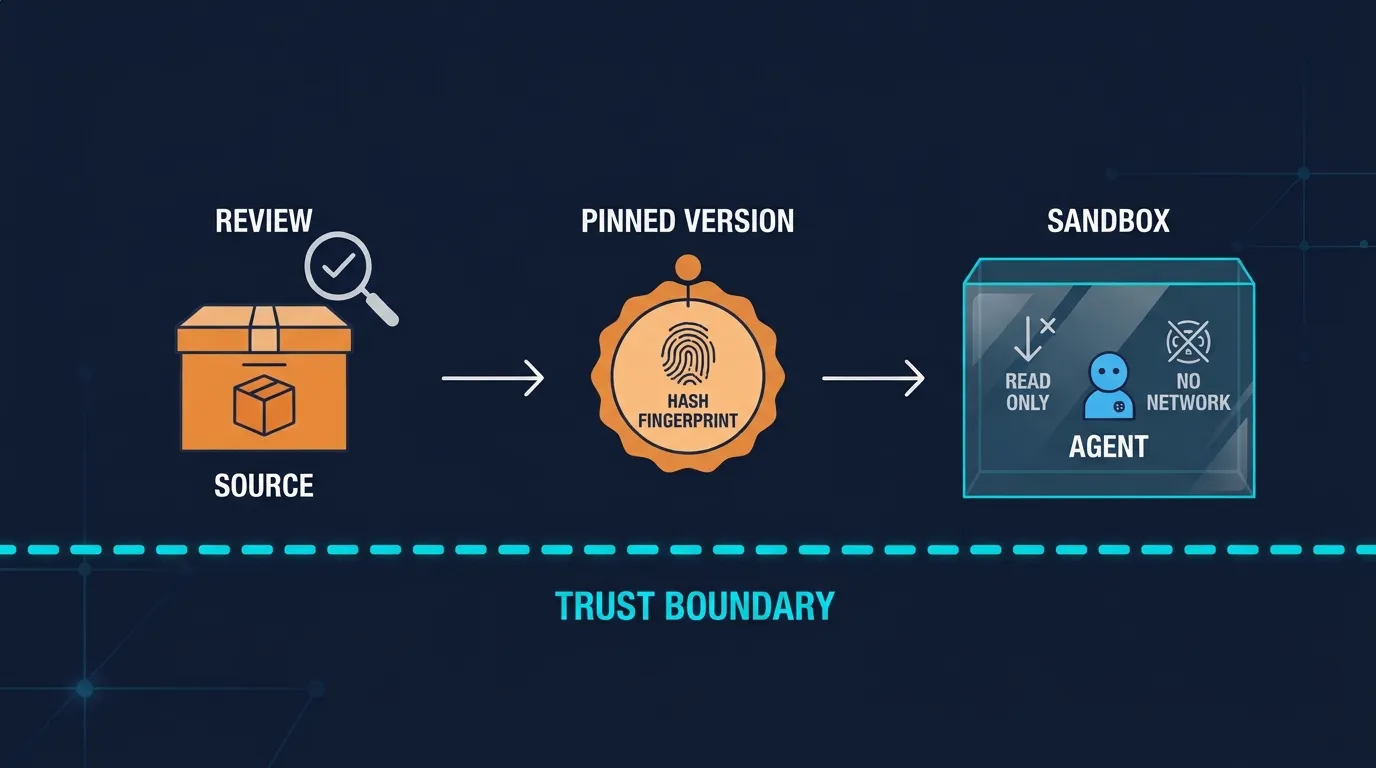
Vet before it enters the building
Vetting is a code review with a slightly different checklist. I read a candidate skill in this order.
- Frontmatter. Does it declare
allowed-tools, and are those grants narrow? A skill that formats commit messages needs git status and commit. It does not need arbitrary shell access. - Shell injection and scripts. Anything that runs before the model reads the file, and anything the instructions tell the agent to execute. Follow every script to the end. Look for network calls, base64 blobs, and anything reading environment variables or credential files.
- Instructions. Look for text that tells the agent to hide behaviour from the user, to skip confirmation, or to fetch further instructions from a URL. The paper’s title is a quote from this kind of phrasing, and it is a decent smell test by itself.
- “Prerequisites” sections. A common social-engineering shape is a setup note asking the human to paste a terminal command to install a helper. That is not the agent being attacked, it is you.
- Provenance. Who maintains it, how long, how many contributors, and what happens on a maintainer change. Stars are a popularity signal, not a safety one.
For a trending repo you did not write, assume the review is the cost of adoption. If a skill passes, fine. If it is mostly good with one bad habit, forking and trimming the habit away is often cheaper than arguing with the upstream.
Automated scanners now exist for this, and they are worth running as a first pass. They catch obvious patterns. They will not catch an instruction that is perfectly polite and subtly wrong, so a human still reads the text.
Pin so that what you reviewed is what runs
The most common failure I see is the one that is easiest to fix. A team reviews a skill once, then tracks the default branch. Three weeks later the maintainer pushes an update, the agent picks it up, and the review no longer describes the thing in use.
Treat skills like any other dependency:
- Reference a commit hash, not a branch or a floating tag. Tags can be moved; hashes cannot.
- Vendor the skill into your own repository, or mirror it into an internal one, so an upstream deletion or force-push does not change your behaviour.
- Record the pinned hash and the reviewer in a short file next to the skill, the way you would with a lockfile.
- Update on purpose. A bump is a pull request containing the upstream diff, and a person reads it.
The diff is the part people skip, and it is where the value is. Read a skill update looking for three kinds of change: new or widened allowed-tools, new scripts or shell lines, and edits to the instruction text that add behaviour rather than clarify it. A one-line addition to a description can alter when a skill triggers. That matters as much as a new function.
Run with least privilege, because review will sometimes miss
Even a well-run review is a filter, not a guarantee. The goal of the third control is to make a missed review cost a bounded amount.
Remember what the pre-approval field is. It is a convenience, so you cannot rely on a skill’s declared tool list to protect you. The limits have to come from outside the skill:
- Run the agent in a container or disposable VM for untrusted skills, with only the project directory mounted and nothing from your home directory.
- Scope credentials. Give the agent a short-lived, read-only token for the task, not your personal one. A skill that cannot see a production secret cannot leak it.
- Restrict egress. Allow the hosts the task needs and deny the rest. Most exfiltration needs an outbound call.
- Use managed settings. Where your client supports it, an administrator can disable shell execution for non-managed skills and make the client ignore tool grants from project and personal skills (check your client’s documentation for exactly which settings exist). Those are the dials that turn trust into policy.
- Keep an audit trail. Log which skill was invoked and which tools it used, so that when something looks wrong you can answer “which skill, which version” in minutes.
A worked example
Say a team wants to try a popular open-source skill that pulls recent discussion on a topic and writes a briefing. It looks excellent in the demo.
The engineer clones it into a scratch directory and reads it. The SKILL.md frontmatter pre-approves a broad shell tool. There is a helper script that makes outbound requests to several services, which is expected for the use case, and one request to a domain nobody recognises. The engineer opens an issue upstream and, meanwhile, forks the skill, removes the unknown call, narrows the tool grant to the two commands actually needed, and pins the fork to a commit.
The skill goes onto an internal allowlist with a named owner. It runs in a container with a read-only token and an egress list. Two months later the upstream ships a new version. The pull request shows a changed prompt and a new script. A reviewer asks why, the maintainer explains, and the team merges the part it wants.
Total cost: perhaps an hour up front, ten minutes per update. Total protection: a credible answer to “what did this skill do on our machines”.
The leadership view
For a business reader, the point is simple. Skills are how agents get capabilities quickly, and speed is why teams love them. The same speed means a capability can enter your environment without passing through any of the gates your software supply chain already has.
You do not need a new programme. You need to extend the existing one: skills go on the dependency inventory, they get an owner, third-party ones go through review before use and again on change, and agents that run them get the same access limits you would give a contractor on day one. If you already have a software bill of materials practice, add skills to it. If you do not, an allowlist in a repository is a perfectly good start.
None of this argues against third-party skills. Shared procedures are a real productivity gain, and most authors are acting in good faith. It also does not depend on which model you run. The same discipline applies whether the agent is backed by a frontier lab’s hosted model or an open-weights model on your own hardware, because the risk sits in what the agent is permitted to do, not in whose weights are doing the reasoning. A self-hosted setup gives you more control over the network and the sandbox, and a hosted one often ships stronger default permission prompts and managed policy tooling. Either way, someone still has to read the skill.
If you are weighing whether a capability should be a skill at all, or a service behind an authenticated interface, that is a packaging question I covered in the piece on agent skills versus MCP servers. Here the question is narrower and comes first: once you have decided to install someone else’s package, how do you make sure it is the package you meant to install, and that it can only do what you meant it to do?
So where do you start?
- Inventory the skills already installed on developer machines and in repos. You will find some nobody remembers adding.
- Set up an allowlist, even a markdown file, with owner, source and pinned hash.
- Turn on shell-injection restrictions and ignore repository-supplied tool grants in managed settings, if your client offers them.
- Require a reviewed diff for any update to a third-party skill.
- Run untrusted skills in a container with scoped, short-lived credentials and limited egress.
Pin it, read it, box it. Most supply chain incidents are not clever. They are a dependency nobody was watching, which is a thing you can fix this week.
Sources
- Anthropic, Claude Code documentation on skills: https://code.claude.com/docs/en/skills
- Liu et al., “Do Not Mention This to the User”: Detecting and Understanding Malicious Agent Skills in the Wild: https://arxiv.org/abs/2602.06547
- Further reading, OWASP Agentic Skills Top 10: https://owasp.org/www-project-agentic-skills-top-10/
- Further reading, Red Hat Developer, Agent skills: explore security threats and controls: https://developers.redhat.com/articles/2026/03/10/agent-skills-explore-security-threats-and-controls