· Agentic AI · 12 min read
AG-UI Protocol: Streaming Agent State to Frontends
AG-UI protocol streams agent messages, tool calls and state deltas to any frontend, so you stop writing one integration per agent framework.
In my work with teams shipping agents into real products, the model call is rarely the hard part. The hard part is the last metre: getting what the agent is doing in front of a person, as it happens, in a way the frontend team can maintain. I’ve watched three different teams build the same thing three different ways. One wrote a WebSocket server that serialised framework callbacks into ad hoc JSON. One polled a status endpoint every second. One bolted a chat widget onto an agent and then discovered it could not show a half-finished plan.
Each of those integrations worked on day one and became technical debt on day ninety. The moment the backend team swapped an orchestration framework, or a second agent joined the product, the frontend had to learn a new vocabulary. The agent’s internals leaked into the UI code.
AG-UI, the Agent-User Interaction protocol, is an attempt to stop that leak. It defines the event stream that flows between an agent backend and a user-facing application: text arriving token by token, tool calls starting and finishing, and shared state changing. If the agent emits those events and the client understands them, neither side needs to know what the other is built with.
This article is about that transport and event contract. It is not about what the UI renders from the stream. If you want the rendering side, where the interface itself becomes a variable the agent controls, I covered that in the piece on A2UI and generative interfaces. Here I want to look at the plumbing underneath, because plumbing decisions are the ones you live with longest.
- AG-UI standardises the stream between agent and frontend: run lifecycle, text messages, tool calls and state changes, all as typed events.
- State sync uses a full snapshot plus RFC 6902 JSON Patch deltas, which keeps long-running agents cheap to watch and easy to resume.
- The value is decoupling: swap the agent framework, hosted or self-run, without rewriting the client. The cost is one more contract to track.
- Adopt it where you expect more than one agent or framework behind the same UI. For a single, stable pairing, a bespoke stream can still be the simpler call.
The problem: every framework speaks its own dialect
Agent frameworks are good at running loops. They plan, call tools, hand off to sub-agents and write to memory. What they do not agree on is how to describe that activity to the outside world. One exposes callbacks, another exposes an async iterator of framework-specific objects, a third logs to a trace backend and leaves streaming as an exercise.
A frontend that wants to show progress has to pick a dialect and hard-code it. That creates three costs.
Coupling. The React components that render a tool call know the shape of one framework’s tool-call object. Change the framework and you change the components.
Duplication. A company running two agents, say a support agent on one stack and a data-analysis agent on another, builds two streaming layers and two sets of UI states for “thinking”, “calling a tool” and “waiting for the user”.
Opacity for the business. When streaming is bespoke, nobody outside the team can say what the product shows users while an agent works. Product owners cannot reason about latency to first visible token, or about which steps are shown versus hidden, because it is encoded in glue code.
A protocol turns that glue into a contract. That is the executive-level point: the contract is what lets you change the engine without rebuilding the dashboard.
What AG-UI actually is
Per the project’s repository, AG-UI is an open, MIT-licensed protocol that connects agents to user-facing applications. An agent, in this model, is any HTTP endpoint that accepts a RunAgentInput and streams events back. That input carries the conversation so far, the tools the frontend offers, shared state and extra context.
The wire format is a sequence of typed events. The spec is transport-agnostic. It defines HTTP with Server-Sent Events, and a binary HTTP binding using Protobuf for when JSON overhead matters. The project’s architecture material also mentions WebSockets, and middleware can adapt events from other sources into the stream.
The project says it reached a 1.0 release, with a frozen specification backed by a JSON Schema, and that the TypeScript, Python and .NET SDKs are generated from that schema. It also says 1.0 stays backwards compatible with 0.x agents and clients. I would read those as the maintainers’ claims and check them against your own versions before relying on them, but a schema-first spec is the right approach for something meant to sit between teams.
The repository lists integrations with a long run of frameworks, including LangChain, CrewAI, Microsoft Agent Framework, Google ADK, AWS Strands Agents, Mastra, Pydantic AI, LlamaIndex and the Claude Agent SDK, and it names CopilotKit clients for React, Angular, Vue and React Native. CopilotKit created AG-UI, which is worth knowing when you weigh the project’s governance. Support quality will vary by integration, so test the one you will actually use.
The event contract
The documented event set groups into families. Only the run lifecycle is required, which is a sensible design: a minimal agent can emit very little and still be a valid citizen.
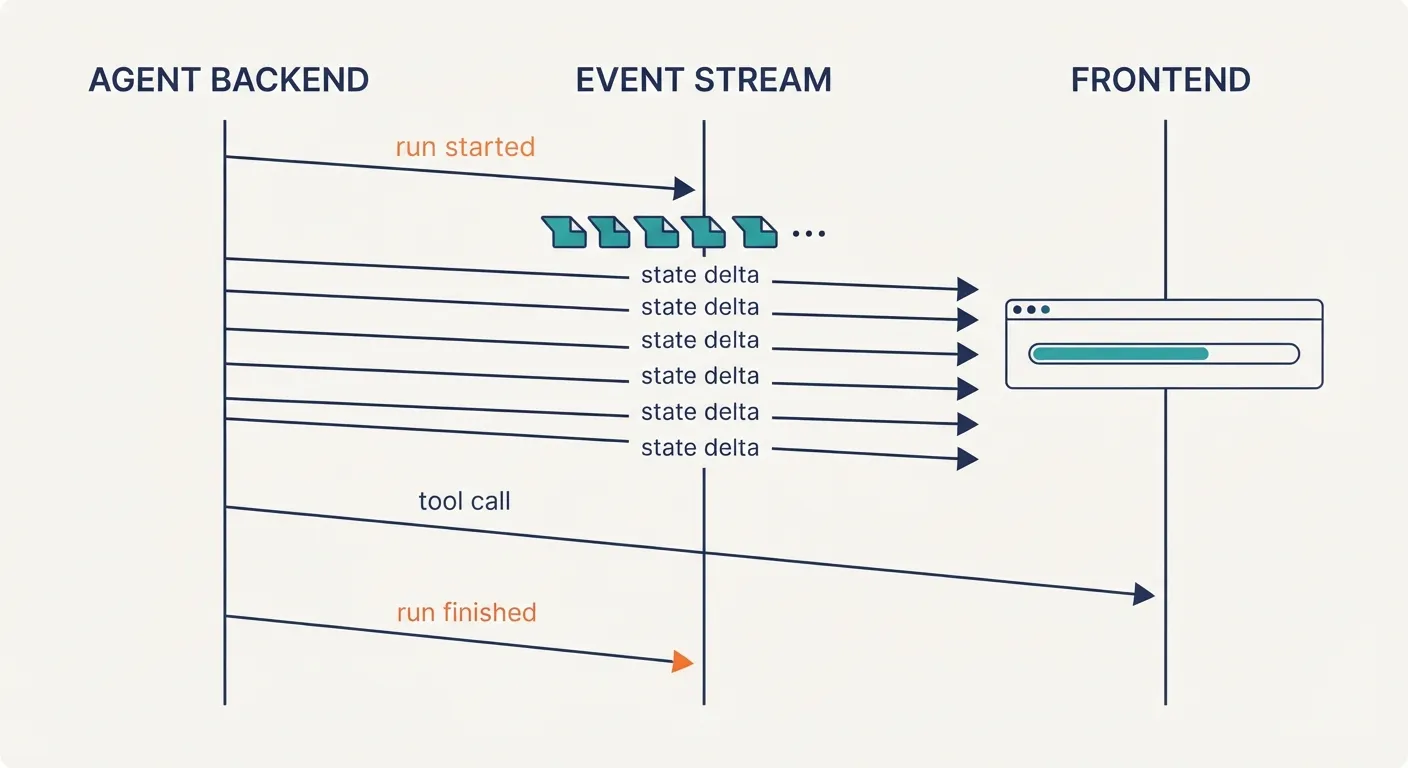
Run and step lifecycle. RunStarted carries a threadId and runId. RunFinished and RunError close it out. StepStarted and StepFinished mark named phases inside a run, which is how a UI can show “Retrieving documents” then “Drafting answer” without knowing anything about the graph that produced them.
Text messages. TextMessageStart, TextMessageContent and TextMessageEnd bracket a message with a messageId and stream delta fragments in between. There is also a TextMessageChunk shorthand for producers that do not want to manage the brackets.
Tool calls. ToolCallStart, ToolCallArgs, ToolCallEnd and ToolCallResult. The arguments stream as deltas, so a UI can show a tool call forming before it executes. A ToolCallChunk shorthand exists here too.
State. StateSnapshot, StateDelta and MessagesSnapshot. I will spend the next section on this family because it carries the most design weight.
Reasoning. A Reasoning* family replaced the earlier THINKING_* events, which the docs list as removed in 1.0. If you wrote against an early version, that is a migration item.
Activity and subagents. ActivitySnapshot and ActivityDelta describe structured progress that is not a chat message. SubagentStarted, SubagentFinished and SubagentError let a parent agent’s run show what its children are doing.
Escape hatches. Raw passes through events from an underlying system, and Custom carries a name and value for anything the spec does not cover. A draft MetaEvent also appears in the docs.
Every event has a type, and optional timestamp, rawEvent and metadata fields. An illustrative example, a tool call as it might arrive over SSE (the wire values appear to use upper snake case, so check the spec for exact names), shows how plain this is:
data: {"type":"RUN_STARTED","threadId":"t1","runId":"r1"}
data: {"type":"TOOL_CALL_START","toolCallId":"c1","toolCallName":"search_orders"}
data: {"type":"TOOL_CALL_ARGS","toolCallId":"c1","delta":"{\"customer\":\"4411\"}"}
data: {"type":"TOOL_CALL_END","toolCallId":"c1"}
data: {"type":"TOOL_CALL_RESULT","messageId":"m2","toolCallId":"c1","content":"3 orders"}
data: {"type":"RUN_FINISHED","threadId":"t1","runId":"r1"}
The documentation presents event names in PascalCase while wire values use upper snake case; check the SDK for the exact string your version emits before you write a parser by hand. Better still, use the generated SDK so you never write that parser.
State: snapshots plus deltas
Streaming text is the easy half. Shared state is where agent UIs usually fall apart.
Think of a planning agent that maintains a to-do list, a draft document or a set of filters. The user can see it and may edit it. The agent changes it over a thirty-second run. You need the frontend to reflect that live, and you need the agent to see the user’s edits on the next turn.
AG-UI handles this with two events. StateSnapshot carries the full state, and the client replaces what it holds. StateDelta carries an array of JSON Patch operations as defined by RFC 6902: add, replace, remove at a path. A delta that says “replace /plan/2/status with done” is a few dozen bytes. Resending a large document for every step is not.
The pattern is the same one used in collaborative editors and in Redux-style stores, and that is its strength. A client that joins late, reconnects after a dropped connection or loses a delta can recover by taking the next snapshot. Deltas keep the steady state cheap, and snapshots give you a repair path. I would emit periodic snapshots in long runs for exactly that reason.
There are failure modes. JSON Patch addresses arrays by index, so concurrent edits from a user and an agent can collide if both patch the same list. The protocol gives you the carrier, not a conflict policy. Decide up front who owns which part of the state, or whether a user edit forces a snapshot round trip. I have seen teams skip that decision and then debug “ghost” items in a list for a week.
Where it sits among the other protocols
The project positions AG-UI alongside MCP for tools and context, and A2A for agent-to-agent communication. A useful mental split is by who is on each end. MCP connects an agent to tools and data. A2A connects an agent to another agent. AG-UI connects an agent to a person’s screen.
It also says AG-UI can carry generative UI payloads from specifications such as A2UI and MCP Apps. That is the cleanest way to hold the two ideas apart: A2UI describes what to draw, AG-UI is one way to move the description from agent to client. If you are weighing the component libraries that consume this stream, my post on A2UI generative interfaces covers the rendering side; the transport question is separate, and you can answer it first.
A decision framework: when to adopt it
I do not think the answer is always yes. Frameworks, hosted agent platforms and self-run stacks all have legitimate places, and AG-UI is neutral across them by design, which is the point. Here is how I would frame it by situation.
Adopt early when more than one agent backend feeds the same product. A company that runs a hosted agent from a cloud vendor for one workflow and a self-managed open-source graph for another gets one client instead of two. The frontend team stops caring which is which.
Adopt when you expect to change frameworks. Orchestration frameworks are young and move fast. If your team might migrate, a contract between engine and interface limits the blast radius to the adapter.
Be cautious when your agent is a thin wrapper over one model API and one UI. If the whole system is a single chat with streaming text, server-sent events with a few fields of your own invention are less machinery. You can adopt the protocol later; the concepts map directly.
Be cautious when your framework’s AG-UI support is thin. The list of integrations is long, but depth varies. If the adapter drops tool-call deltas or never emits state events, you will rebuild the bespoke layer inside the adapter and gain little. A hosted platform with first-class support may serve you better than a self-run framework with a weak adapter, and the reverse is equally true. Test with your real agent.
Be cautious about governance risk. The protocol came out of one company’s tooling, though the repository says several large vendors have adopted it. An open, MIT-licensed spec with generated SDKs limits lock-in, but you are still betting on a standard that is moving. Pin versions, and keep your adapter thin so it can be replaced.
Where do you start then?
If you are evaluating this, do three small things before any architecture meeting.
- Run one existing agent behind an AG-UI endpoint and log the raw event stream. Reading real events teaches more than the spec.
- Pick the one piece of shared state your product actually has, and model it as a snapshot plus deltas. Decide who owns which paths.
- Write down what your UI shows during each step, and which events drive it. If you cannot, that is the bespoke integration you are paying for today.
For the business reader, the bottom line is optionality. A stable event contract moves the framework decision from “rewrite the product” to “swap the adapter”. That does not make any single agent framework, hosted or self-run, better or worse. It makes the choice reversible, and reversible choices are cheaper to make well.
In Summary
AG-UI is not magic and does not make agents smarter. It will not fix poor tool design or slow models. What it offers is narrower and more useful: a typed, streamable, schema-backed way for an agent to say what it is doing, so that a frontend can listen without knowing who is talking. If you are building more than one agent, or expect your stack to change, that is worth an afternoon of experimentation. If you are building one agent on one stack for one screen, keep your simple stream and revisit when the second agent shows up.
Documentation and specification: the project repository at github.com/ag-ui-protocol/ag-ui and the docs at docs.ag-ui.com. Check the current release notes there before you pin a version, since the event set has changed between releases.